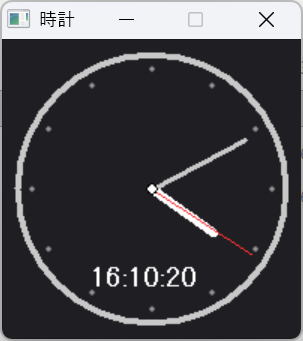
Pascalで図形とテキストを表示するための、簡易ライブラリ(Windows11用)を作ってみました。線、円、四角形、テキストの表示が可能です。 囲まれた部分の塗りつぶしも可能です!
詳しい内容はリファレンスにまとめていますので、こちらを参照してください。
下のリンクからファイルをダウンロードできます。
petitdraw.zip ※ZIP形式で圧縮されてるので、使う前に解凍してください!
{$APPTYPE GUI}
program ClockSample;
{$MODE DELPHI}
uses
Windows, SysUtils, Math, PetitDraw;
type
TApp = class
procedure OnUpdate;
end;
var
App: TApp;
Draw: TPetitDraw;
procedure TApp.OnUpdate;
var
h, m, s, ms: Word;
cx, cy, i: Integer;
s_angle, m_angle, h_angle: Double;
sx, sy, mx, my, hx, hy: Integer;
begin
DecodeTime(Now, h, m, s, ms);
Draw.Clear(RGB(30, 30, 35));
cx := 100;
cy := 100;
// 文字盤(外枠)
Draw.DrawCircle(cx, cy, 90, 4, RGB(200, 200, 200), COL_NONE);
// 12個の目盛り
for i := 0 to 11 do
begin
Draw.DrawCircle(
cx + Round(80 * Cos(i * 30 * Pi / 180)),
cy + Round(80 * Sin(i * 30 * Pi / 180)),
2, 1, RGB(100, 100, 100), RGB(150, 150, 150)
);
end;
// 角度計算
s_angle := (s + ms / 1000) * 6 - 90;
m_angle := (m + s / 60) * 6 - 90;
h_angle := (h mod 12 + m / 60) * 30 - 90;
// 時針
hx := cx + Round(50 * Cos(h_angle * Pi / 180));
hy := cy + Round(50 * Sin(h_angle * Pi / 180));
Draw.DrawLine(cx, cy, hx, hy, 6, RGB(255, 255, 255));
// 分針
mx := cx + Round(70 * Cos(m_angle * Pi / 180));
my := cy + Round(70 * Sin(m_angle * Pi / 180));
Draw.DrawLine(cx, cy, mx, my, 3, RGB(200, 200, 200));
// 秒針
sx := cx + Round(80 * Cos(s_angle * Pi / 180));
sy := cy + Round(80 * Sin(s_angle * Pi / 180));
Draw.DrawLine(cx, cy, sx, sy, 1, RGB(255, 50, 50));
// 中心の丸
Draw.DrawCircle(cx, cy, 4, 1, RGB(0, 0, 0), RGB(255, 255, 255));
// デジタル表示
Draw.DrawText(FormatDateTime('HH:nn:ss', Now), 60, 150, 18, RGB(255, 255, 255));
Draw.Present;
end;
begin
App := TApp.Create;
Draw := TPetitDraw.Create('時計', 200, 200);
try
Draw.OnUpdate := App.OnUpdate;
Draw.Run;
finally
Draw.Free;
App.Free;
end;
end.
|